To look up a building permit by address, start with the city or county department that issued permits for the property. If you do not know the agency, use the USA.gov local government directory, then open the building, planning, development services, or inspections department’s official site. Search with the official street address first. Also have the parcel number (APN, PIN, or similar local identifier), building identifier such as a New York City BIN, permit or application number, approximate work date, and owner or contractor name when available.
Your next action is to open every plausible individual record, not stop at the result list. Compare the property address, work description, issue date, permit number, inspection history, and final or closed status. Save the issuing agency and stable record number with the result. If the first search returns nothing, normalize the address, try the parcel identifier, check the agency’s legacy system, and then ask its records office for the missing period.
This guide explains the search process; it is not a government database. It cannot establish whether work was lawful, complete, or code-compliant. For a jurisdiction-specific starting point, use the Building Permit Official Sources Directory.
Identify the issuing department before you search
A permit record is owned by the jurisdiction that reviewed the work. The correct source may be a city building department, county development office, consolidated planning agency, or a contracted regional portal. A postal address alone does not prove jurisdiction: properties near city boundaries may use a city mailing name but fall under county authority.
- Confirm whether the parcel is inside city limits and note the issuing department’s exact name.
- Copy the address exactly as the assessor or official property page formats it, including directionals and unit numbers.
- Collect a stable parcel or building identifier before changing search terms.
- Set an approximate work-date range so you can identify records that may live in an older system.
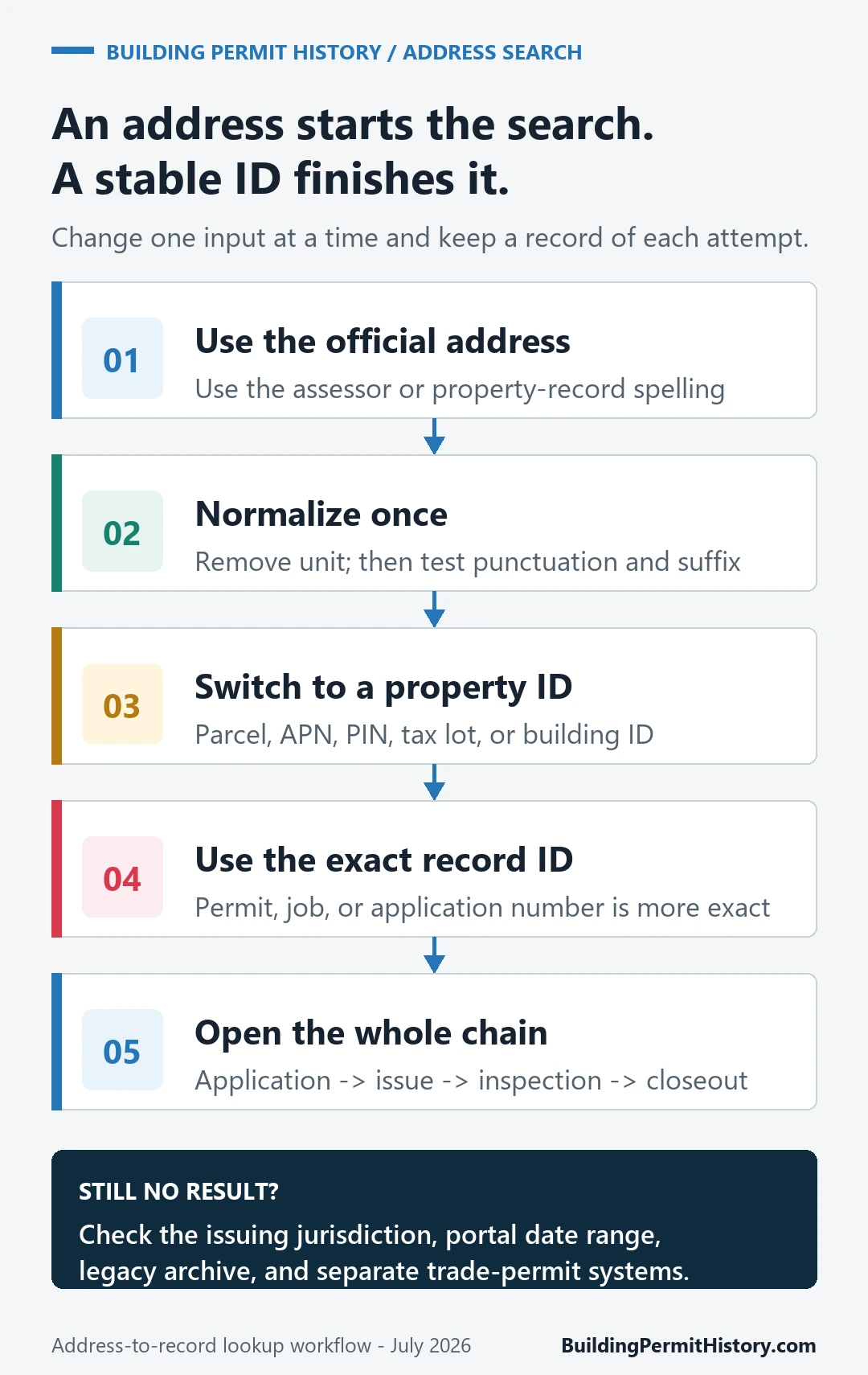
Search the address, then move to a stable identifier
- Start broad but exact. Enter the official house number and street name. Leave the unit blank unless the portal requires it.
- Normalize once. If there is no match, remove punctuation, try the directional in full and abbreviated forms, and test the base address without a unit.
- Switch to the parcel or building ID. An APN, PIN, parcel ID, or BIN is usually more stable than spelling and unit formatting.
- Open each record. A summary row may omit inspections, amendments, certificates, or closeout documents.
- Build a record chain. Link the application, issued permit, revisions, inspections, correction notices, final approval, and certificate when the portal provides them.
Do not assume that a record-number search and an address search cover the same years. Some agencies separate current applications from historical permits, archived cards, scanned plans, or public-records requests.
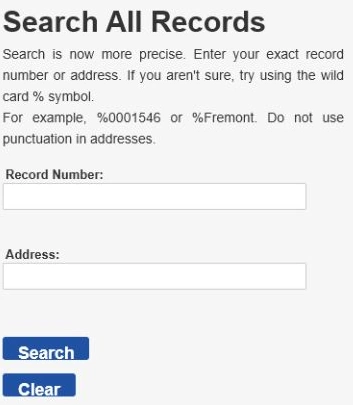
Seattle example: address and record-number search
Seattle SDCI’s Research a Project page routes users to the city’s official research tools. In the Seattle Services Portal Search All Records form, use an exact record number when you have one or the address fields when you do not. The form’s own instruction says not to use punctuation in addresses.
New York City example: current and legacy records can be separate
New York City demonstrates why one empty result is not the end of a search. Start with NYC Department of Buildings’ Building Applications & Permits and Find Building Data pages. NYC DOB explains that filings may be divided between DOB NOW and the legacy Buildings Information System (BIS). Use the address, borough, block and lot, BIN, or job and permit number supported by the relevant system.
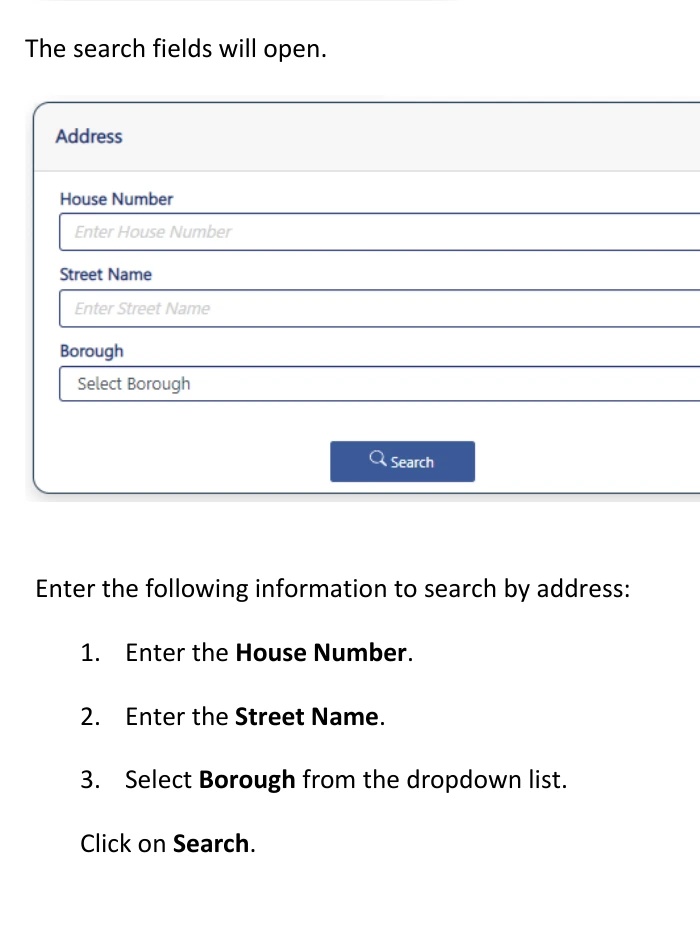
For each NYC match, preserve the issuing system, official address, borough-block-lot or BIN, job or permit number, work type and description, filing and issue dates, applicant or contractor when shown, inspection results, sign-off or final status, and any certificate of occupancy reference. The same evidence discipline applies elsewhere even though field names differ.
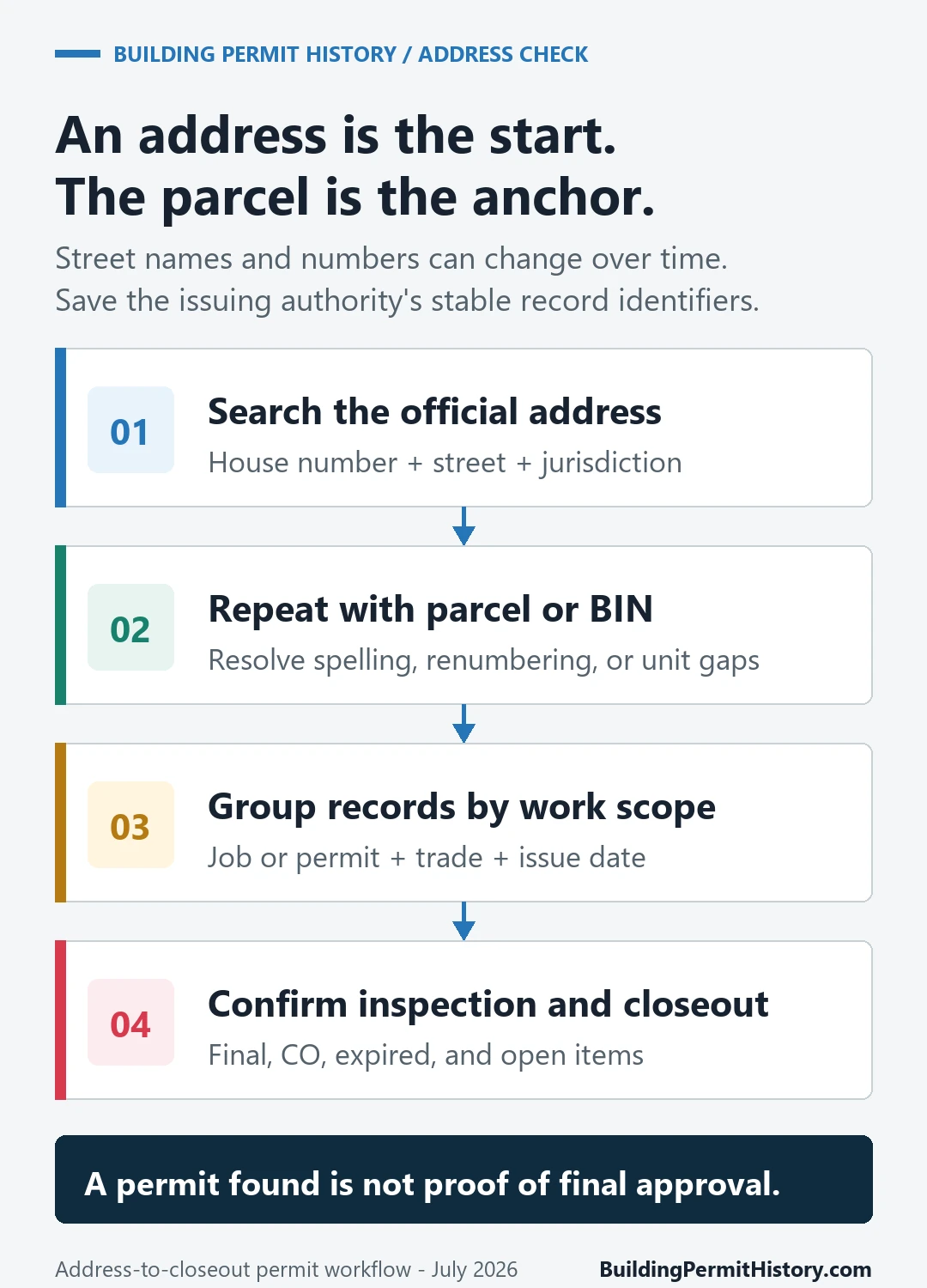
What to record from each permit result
- Identity: issuing agency, portal or database name, address as displayed, parcel or building identifier, and permit or application number.
- Scope: work description, permit type, valuation if shown, and related applications or revisions.
- Timeline: application, issue, expiration, inspection, final, and certificate dates.
- Outcome: issued, active, expired, withdrawn, revoked, finaled, closed, or other local status, copied exactly rather than reinterpreted.
- Evidence: the official record URL, retrieval date, downloadable documents, and the name of the office to contact for omissions.
An issued permit alone is insufficient to show that all required inspections passed. A final inspection does not necessarily answer every occupancy, zoning, fire, electrical, plumbing, or historic-review question. Read the agency’s definitions and look for linked records before drawing a conclusion.
If the question is who did the work, copy each name with the role shown beside it, then follow how to check which contractor is named on a permit at an address.
No-result recovery checklist
- Verify the jurisdiction and spelling against an official assessor, parcel, or address source.
- Retry without punctuation, unit, ZIP code, street suffix, or directional; then try the locally preferred form.
- Search by parcel, APN, PIN, BIN, block and lot, permit number, or application number.
- Check whether the agency divides current and legacy records by year or system.
- Look for open-data downloads, scanned permit cards, archive indexes, or a public-records request page.
- Contact the records custodian with the address, parcel ID, work-date range, owner names, and the exact systems already searched.
Keep a short search log. Record the system, search field, value, filters, date searched, and result. That makes a no-result finding reproducible and prevents a portal outage or formatting mismatch from being mistaken for proof that no permit exists.
Permit lookup by jurisdiction: 16 official portals compared
We checked the official permit pages of 16 cities and counties on October 21, 2026. Twelve say you can search permits by street address. Only four publish how far back the online records go: Los Angeles (building permits from 1905), Maricopa County (October 1999), Hillsborough County (2004–2005) and Seattle (2005). Houston’s online search covers permits sold in the last three years.
Older records mean a request to the permit office or a public records portal. Five jurisdictions state a turnaround, from 5 working days in Richmond to 7–10 business days in San Jose and Maricopa County. Costs range from $0.10 a page for LADBS copies to a flat $250 research fee for a commercial file in Maricopa County. “Not confirmed” marks a value the official pages leave out, so ask the office before you rely on it.
- Houston, TX
- Address search: Not confirmed. The Houston Permit Portal lets you search and track permits; the City’s pages don’t say whether search works by address.
- Online records start: The City says its online permit search covers permits sold in the last three years.
- What you can see: Permit status from submittal to issuance, and inspection history (City permits and inspections page).
- Older records: Public Information Act request; building and occupancy records go to Houston Public Works. Fee and processing time: not confirmed.
- Horry County, SC
- Address search: Not confirmed. The Code Enforcement page describes its Online Portal for office-submitted permit cases and inspection scheduling.
- Online records start: Not confirmed.
- What you can see: Permit cases, plus online inspection scheduling for some residential permit types (Code Enforcement).
- Older records: FOIA request through the Public Information Office: $0.15 per page plus $25 per hour of staff time, paid before release. Processing time: not confirmed.
- Jacksonville / Duval County, FL
- Address search: Not confirmed. The Building Inspection Division lists JAXEPICS as its permit and inspection information portal.
- Online records start: Not confirmed. Permits before 1998 marked Expired may lack a CO and need staff research (City permit page).
- What you can see: Status (Active, Finalized, Cancelled, Expired); a CO or Certificate of Completion prints for finalized permits (City permit page).
- Older records: Public Records Request Center: first 10 pages free, then $0.15 per one-sided page, plus staff time beyond 30 minutes. Processing time: not confirmed.
- Hillsborough County, FL
- Address search: Yes. Building Permit Reports search by street name, folio or permit number for records before January 20, 2021; HillsGovHub after that date.
- Online records start: 2004–2005 for Permit Reports (the county records page gives both years); 1976–2004 records are offline.
- What you can see: Inspections, inspection requests and certificates of occupancy, which exist from 2012 (county records page).
- Older records: County records request: first 10 pages free, then $0.15 per page; research over 30 minutes is billed hourly (records search guide). Processing time: not confirmed.
- Madison, WI
- Address search: Yes. The Permit Reports page links an Accela search by address or contractor.
- Online records start: Not confirmed.
- What you can see: Inspection results once the inspector enters them (Building Inspection services).
- Older records: City Public Records Request Center. Fee and processing time: not confirmed.
- San Jose, CA
- Address search: Yes. SJPermits searches by address, APN, permit number or tract.
- Online records start: Not confirmed.
- What you can see: Work type, expiration date, status by division, and inspections with dates and results (City status guide).
- Older records: Email the PBCE document duplication form: research $45 per half hour, prepaid. Most requests take 7–10 business days; plan copies can take 30–40 days.
- Los Angeles, CA
- Address search: Yes. LADBS Online Building Records and Atlas search by address.
- Online records start: Building permits from 1905; certificates of occupancy from 1940 (LADBS).
- What you can see: Permits, certificates of occupancy, plot plans and approved plans (LADBS).
- Older records: Email the Records Research Request Form: copies $0.10 per page; allow 5–7 working days.
- New York City (DOB)
- Address search: Yes. BIS by house number and street, BIN or block and lot; DOB NOW by address, BBL, BIN or job number.
- Online records start: Not confirmed for permits. Older and eFiling jobs stay in BIS; DOB NOW covers its own filings (DOB NOW FAQ).
- What you can see: Jobs and permits, CO, complaints, violations and inspections (DOB building data).
- Older records: Request folders, plans or microfilm in DOB NOW: BIS Options and pick them up at the borough office. Status email within 2 business days; off-site records take about a week. Certified staff copies $8 for the first page, $5 after (DOB records request guide, 2021).
- Maricopa County, AZ
- Address search: Not confirmed. The county permit research page describes searching permit history by parcel.
- Online records start: October 1, 1999 in Permit Viewer; May 18, 2009 onward in Permit Center (county page).
- What you can see: Includes expired, terminated and final-inspected projects (county page).
- Older records: Permit Research Request form by mail with a check: $100 residential, $250 commercial. Average 7–10 business days.
- Cleveland, OH
- Address search: Yes. The Citizen Access search guide uses street number and street name.
- Online records start: Not confirmed.
- What you can see: Record type and, for some records, downloadable PDF attachments (search guide).
- Older records: Mail the Records Request Form or email Building & Housing records (Records Administration). Fee and processing time: not confirmed.
- Miami-Dade County, FL
- Address search: Yes. The Building Permit search accepts permit number, process number or address.
- Online records start: Not confirmed.
- What you can see: Permit status and inspection history; certificates of occupancy through a separate search (ePermitting menu).
- Older records: Building plans microfilm: research fee $18.75 residential, $46.34 commercial; copies $0.15 per page. Many 1961–1972 records were destroyed. Processing time: not confirmed.
- Montgomery County, MD
- Address search: Yes. DPS Data Search takes street number and street name.
- Online records start: Not confirmed.
- What you can see: Permit type, work type, application date, reviews and inspections (DPS Data Search).
- Older records: Online records request through a DPS account; staff quote fees under Executive Regulation 27-01AM before processing. Processing time: not confirmed.
- Seattle, WA
- Address search: Yes. The Seattle Services Portal and the Permit & Site History tool search by address (SDCI research page).
- Online records start: 2005 for permits and inspections in the portal; scanned microfiche covers 1970–2004; pre-1970 film by request (SDCI).
- What you can see: Permit status, inspection status, related permits and documents (SDCI).
- Older records: SDCI Microfilm Library or the City public records request center; copies $0.15 per page (SDCI public disclosure). Processing time: not confirmed.
- Santa Barbara, CA
- Address search: Yes. The Accela permit portal (address, permit or parcel number) and the Property Records Database (City property records page).
- Online records start: Not confirmed.
- What you can see: Application status in Accela; street files, planning files and certificates of occupancy (or signed final job cards) in the records database (City).
- Older records: Records & Archives counter; plan sets are viewed in person by appointment (City). Fee and processing time: not confirmed.
- Richmond, VA
- Address search: Yes. The Online Permit Portal’s Search Public Records works without logging in (portal user guide).
- Online records start: Not confirmed for the portal. The Library of Virginia holds 1907–1976 City permit records on microfilm.
- What you can see: Permits, plans and inspections (portal user guide).
- Older records: Planning & Development Review FOIA form: $0.25 per page plus $22 per hour of research; response within 5 working days.
- St. Louis, MO
- Address search: Yes. Building Permits Search by Address takes a street address or parcel.
- Online records start: Not confirmed.
- What you can see: The open dataset lists permit type, description, issue and completion dates, cost and use.
- Older records: Sunshine Law request through the City’s GOV/QA portal. Fee and processing time: not confirmed.
Local guides and next steps
Use a local guide when the issuing jurisdiction is known: New York City, Chicago, Los Angeles, Seattle, Austin, or Pima County. These links route to separate city or county guides; their content is not reproduced here.
If you already have a record identifier, continue with the permit number lookup guide. For older work, use the old building permit lookup guide to plan the archive and records-office step.
Limitations and source verification
Online coverage varies by jurisdiction, record type, and year. Address changes, parcel splits and merges, unit renumbering, migration gaps, exempt work, and separate trade-permit systems can all produce incomplete results. Portal data can also change after retrieval. For a purchase, dispute, property-condition decision, or formal conclusion, confirm the record with the issuing agency and obtain certified or complete records when appropriate.
Last verified: August 31, 2026. The page’s routing instructions and official source links were reviewed on that date. The preserved Seattle and NYC image captions retain their own July 22, 2026 source-check dates. Those older caption dates describe when the pictured source material was checked; they are not a claim that a live portal screen was re-captured or guaranteed unchanged on August 31.