A building application record documents proposed work and its review before permit issuance. It does not by itself prove that a permit was issued, work began, or the project was completed. Identify the authority, property, application or project number, filing date, and exact status, then follow the review record to an approved set, issued permit, or other final disposition.
Separate the application file from the issued permit
An application record shows the proposed scope and its review path; it is not proof that a permit was issued or that work was completed. Match the application number, property identity, proposed work, applicant, submission date, review comments, revisions, and decision. Then locate the issued permit number and approved plan set that came from that application, if any.
- Application stage: submitted scope, assigned project or job number, fees or intake events, review disciplines, comments, and resubmittals.
- Decision stage: approved, denied, withdrawn, expired, or another agency-specific outcome copied exactly.
- Permit stage: the separately issued permit, its conditions, related trade permits, inspections, amendments, and closeout.
- Missing link: if the portal shows an application but no permit, do not infer issuance; request or locate the decision and issued-record cross-reference.
Use the responsible authority’s own portal for the property. If the jurisdiction is unclear, begin with the USA.gov local government directory. For a New York City record, NYC DOB Building Applications and Permits and Find Building Data are the official routing pages; keep the application or job identifier attached to every later permit and plan record.
Use both the address and parcel number
For the permit-application history, have the street address, parcel number, owner or applicant name, permit number, and an approximate work date ready.
- Exact street address
- Parcel or assessor number
- Permit or application number
- Issuing city or county
From review comments to the approved plan set
Plan-review comments are not permit approvals. They document issues, questions, or required changes during review. To reconstruct the pre-issuance record, connect each comment to the applicant’s response, the changed sheet or document, a later review outcome, and the plan set that was ultimately approved. A response saying “revised” is incomplete evidence unless the corresponding revision can be identified.
The process differs by jurisdiction and portal, but the evidence question remains the same: what did the reviewer ask, what changed, and which later official record shows that the issue was resolved?
Seattle SDCI’s official How to Respond to Review Comments page describes an electronic correction cycle. It tells applicants to wait until reviews are complete, respond to each item in the consolidated report, describe each change or explain why a change was not made, mark changes on the plans, and upload a complete corrected plan set rather than isolated sheets.
Portland’s Review Comments Quick Step Guide shows another version of the evidence chain. Its ProjectDox workflow distinguishes markups, library comments, comments, and inquiries, and records statuses such as resolved or unresolved. Portland says responses capture author, time, and cycle information, while revised drawings must be changed in the source file and uploaded with the same filename so the portal can version them. Its Applicant ProjectDox Quick Start Guide also identifies reports for unresolved comments, department review status, workflow routing, and uploaded-file versions.
These are local examples, not universal portal instructions. Use the responsible authority’s current terminology and source-check date.
Build the comment-to-approval evidence chain
Use one row for each review item that matters to the scope being researched.
| Review-cycle fact | Evidence to match | Question it answers | Limit to preserve |
|---|---|---|---|
| Comment or markup ID, discipline, and date | Consolidated report, comment list, or marked sheet | What issue did the reviewer identify? | A comment is not a denial or an approval by itself |
| Applicant response | Response letter or portal response with cycle metadata | What did the applicant say was changed or why no change was made? | A response does not prove the reviewer accepted it |
| Changed sheet or document | Revision cloud, sheet version, calculation, report, or specification | Where was the proposed correction made? | An uploaded file may be superseded or unapproved |
| Later review outcome | Resolved status, approval event, or later comment cycle | Did the reviewing discipline accept the response? | One discipline’s approval may not complete all reviews |
| Issued plan set | Stamped set, approved index, permit number, and issue date | Which version became part of the permit? | Approved plans do not prove construction matched them |
Keep the complete comment text in the private project file where access permits. In a summary, use a short, accurate description and cite the official document. Do not remove a qualification that changes the meaning of the comment.
Follow one item across every review cycle
Begin with the earliest complete correction report available. Assign the official comment or markup ID exactly as shown. Record the reviewing discipline, date, requested correction, and any code or document reference. Then locate the applicant’s response and the actual changed sheet, report, or calculation.
Move to the next cycle and ask whether the same item was resolved, revised again, carried forward, or replaced by a new comment. Repeat until the reviewing discipline records an accepted outcome or the application ends. Finally, compare the resolved item with the issued plan set. If the changed sheet is absent from the approved index, the evidence chain needs clarification.
A colored revision cloud can help locate a change, but it does not establish approval. A portal’s latest upload can also be an applicant file awaiting review. The approval stamp, review event, issued plan index, and permit number provide the stronger connection.
Distinguish corrected resubmittals from post-issuance revisions
San Jose’s official Resubmittal/Revision Service draws an important boundary. Corrected-plan resubmittals answer comments while a plan is under review. Revisions change an already approved plan after the permit has been issued. San Jose’s page also calls for a response-to-comments letter and separates trade-plan handling where applicable.
Keep that boundary in this application-record guide:
- Before issuance: comments, correction reports, response letters, corrected sheets, review cycles, and the approved plan set belong to the application record.
- After issuance: amendments, revised approved plans, field changes, and their effect on inspections belong to the permit revision record.
Do not merge both into a single undated “latest plan.” A future reader must be able to see whether the controlling change occurred during review or after issuance.
If part of the correction record is missing
Search the portal’s reports, reviews, tasks, documents, and version history using the complete application or project number. Ask the applicant or design professional for the response package when appropriate, but verify it against the official file. If records are not online, submit a targeted request for the named correction report, cycle, response letter, or approved plan set.
Provide the property address, application or project number, document type, discipline, and approximate review date. “All plan-review records” can be harder to search and interpret than a request for the second-cycle structural correction report and corresponding approved sheet set.
An unavailable response does not prove the applicant ignored the comment. An item marked resolved does not prove the work was later built or inspected. State the missing link precisely.
For broader access questions, see Are Building Permits Public Records?. For permit and application identifiers, use the Permit Number Lookup Guide.
Stop the chain at the correct endpoint
The pre-issuance chain ends when the application produces the issued permit and its approved documents, or when the application is withdrawn, canceled, denied, expired, or otherwise ends under the local process. It does not extend automatically to construction completion.
After issuance, use the approved set as the baseline for later revisions and inspections. A permit can be issued even though future trade permits remain necessary, and the approved plan does not prove the finished work matched every sheet. Continue with Building Permit Records: What They Show and Final Inspection Status Check for those later evidence layers.
The useful conclusion is narrow: the review record can show how a proposed design changed before issuance and which version the authority approved. It cannot certify current conditions, construction quality, or compliance beyond the reviewed and issued scope.
Open the permit, inspection, and completion history
- Open the application or project record that matches the property, proposed scope, and filing date.
- Follow review comments, applicant responses, revised files, and later review outcomes by cycle.
- Record the application’s exact disposition without translating approval of a review step into permit issuance.
- If a permit was issued, capture its separate number and move inspections, amendments, and closeout into the permit-stage record.
- If a stage is missing, request the named comment report, response package, approved plan set, decision, or permit cross-reference.
Read issued, finaled, expired, and open separately
To complete the permit-application history, the result is strongest when the permit, inspection events, and final status refer to the same scope of work and property.
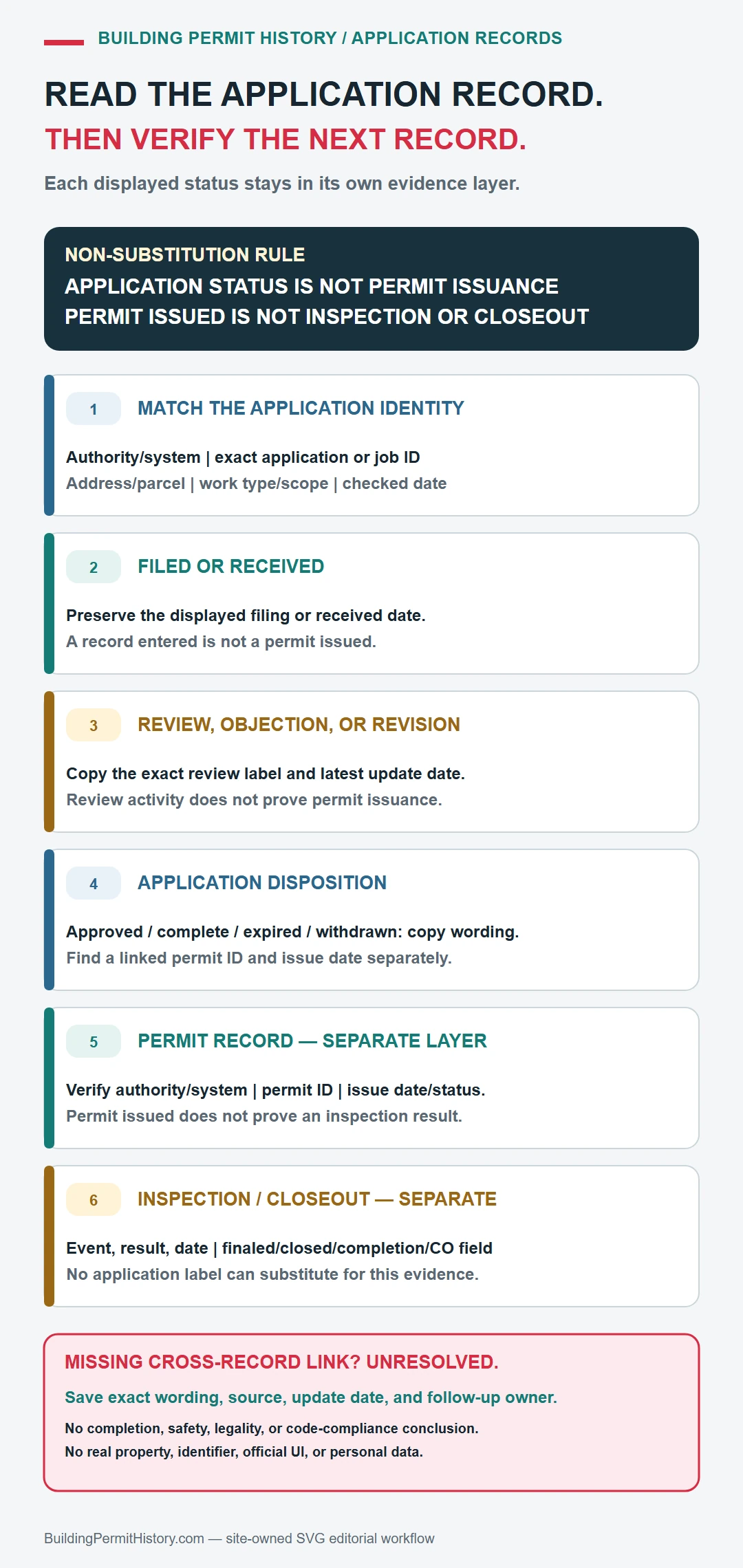
| Record layer | Keep it separate because |
|---|---|
| Application | It records the proposed scope, review cycles, revisions, and disposition; it does not by itself prove permit issuance. |
| Issued permit | It identifies the authorized scope and conditions under its own permit number. |
| Inspection or closeout | It records later field events and outcomes tied to the permit, not to the application alone. |
| Separate review or trade record | Planning, fire, electrical, plumbing, or mechanical work may have its own identifier and outcome in the responsible system. |
A permit entry found through building application records does not by itself prove that the work passed final inspection, matches the building today, or complied with rules owned by another department.
If the permit history is incomplete
For a missing application item, give the issuing office the property, application or project number, filing year, review cycle, discipline, exact document or decision needed, and the reports, document areas, or version history already searched. Request that named item and keep any later permit number separate.