No nationwide database owns every U.S. building permit record. Start with the government that has permitting authority over the parcel, using the USA.gov local-government directory when the jurisdiction is unclear. Confirm the city, county, town, or special district and the office’s exact name, then route the same search through its current portal, legacy or archive system, open-data catalog, and records office. Save the government domain and stated date coverage before interpreting a blank result.
Last verified: August 31, 2026. The official routing links for New York City, Chicago, Portland, Seattle, Los Angeles, Boston, and Austin were included in the current source review. A government portal can change after that date, so report a broken route through the site’s Contact page.
Issue a jurisdiction ticket before opening a permit portal
| Ticket field | Value to establish | Reason it controls the search |
|---|---|---|
| Physical jurisdiction | Municipality, unincorporated county, town/township, or special authority | Mailing city and permit authority can differ |
| Parcel identity | Parcel/APN/PIN/BBL plus complete address | Addresses change and multi-building parcels can share street text |
| Record family | Application, issued permit, trade permit, inspection, plan, certificate, violation, or correspondence | Different offices and portals may own different layers |
| Approximate period | Construction or filing year range | Current and legacy systems often divide records by date |
| Known identifier | Permit, application, job, project, or inspection number | The record identifier exposes details that an address list may hide |
Do not select a similarly named department until its jurisdiction page matches the parcel. A county assessor can identify a parcel without being the permit custodian, and a city clerk can route a records request without operating the permit database. Keep the office’s exact name and government domain on the ticket.
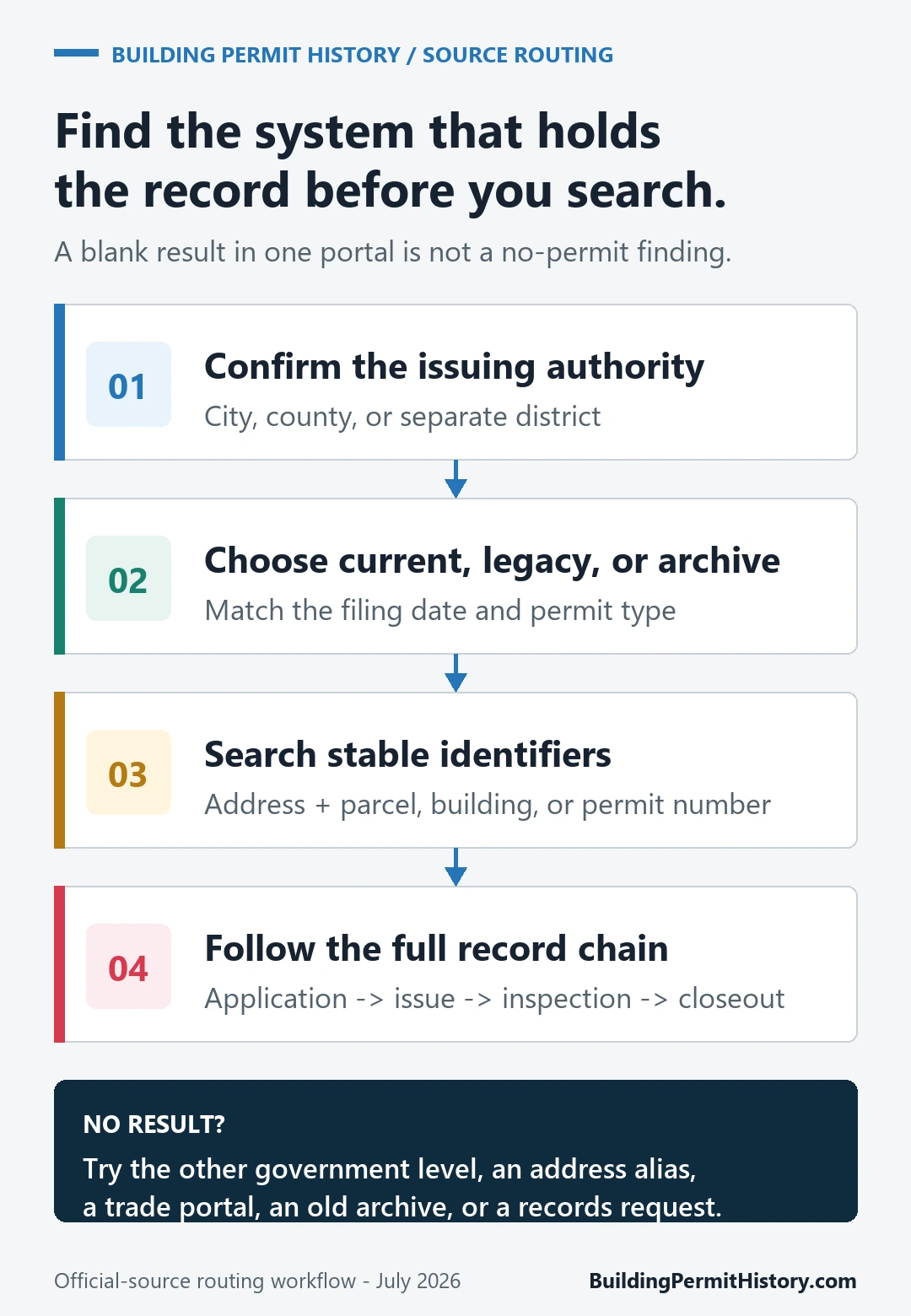
Route one ticket through four source layers
- Open the permitting authority’s official landing page and locate its public property or permit search.
- Search the complete address and parcel identifier, then open each permit, job, or project number that matches the period and scope.
- Check the authority’s legacy database or historical-record tool when the current portal’s date coverage does not reach the suspected work.
- Use an official open-data dataset to enumerate candidate records when available, but return to the permit detail or document for interpretation.
- Request a named existing record from the correct custodian when the online index identifies a permit but does not supply the needed document.
| Layer | Best use | A blank result can mean |
|---|---|---|
| Current transaction portal | Recent applications, current reviews, permits, inspections, and status | Work predates the system, address mismatch, hidden pre-filing item, or different jurisdiction |
| Legacy building system | Older jobs, permits, complaints, inspections, or occupancy records | The file is archived, indexed under a former address, or held by another unit |
| Open-data table | Filter and export many issued or filed records | The dataset excludes a record class, period, voided item, or non-digitized file |
| Records office/archive | Plans, microfilm, docket/index cards, certified copies, and non-downloadable files | No responsive record under the supplied identity and scope; confirm the custodian and retention period |
New York City requires a current-and-legacy pair
NYC Department of Buildings’ Find Building Data page assigns older job applications and permits to BIS while DOB NOW Public Portal contains DOB NOW filings and certificate-of-occupancy information. The Department’s Public Portal guidance says researchers should use both systems: the Public Portal can search property profiles by address, Borough-Block-Lot, BIN, or job number, while complaints and some violation families remain in BIS.
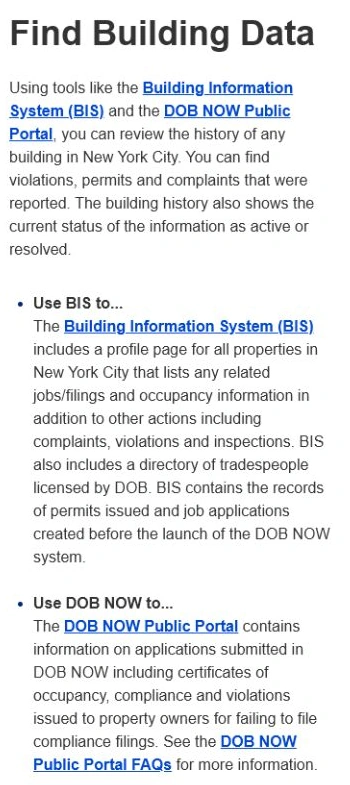
For NYC, make BIN or BBL the property anchor after the first address match. Record each BIS job number and DOB NOW filing separately. If plans or an underlying file are not visible, NYC directs record requests for folders, plans, microfilm, docket books, reels, index or I-cards, and curb-cut cards through DOB NOW: BIS Options rather than through a general web search.
Chicago separates issued data from live application review
The Chicago Building Permits dataset lists issued permits from 2006 forward and includes address components, permit numbers, issue dates, work descriptions, conditions, parcel numbers, and contractor fields. Treat the permit number as the stable key for a reproducible export. The separate Building Permit Application Status help says its address search is limited and its application site covers items started within the last 36 months. Use the dataset for issued history, then carry the application or permit number into the operational system to review open items, holds, corrections, inspections, and closeout evidence.
Portland publishes a document-availability window
The Portland Permitting & Development public-records page directs users to PortlandMaps and explains that plans and applications for permits issued from June 1, 2012 through December 2023 are available there, while records outside that window and some newer documents may require a formal request. Portland also publishes separate general-search, advanced-search, and permit-status help guides. Search the address, open the permit ID or use the IVR/permit number, and name the exact record family—plans, trade permit, inspection card, certificate of occupancy, review comment, or checksheet.
Seattle joins recent projects to a site-history library
Seattle SDCI’s Research a Project page routes address or project-number searches for 2005-present activity to the Seattle Services Portal, including project description, permit status, inspection status, related permits, and available documents. The Permit and Site History tool adds a development-site identity, records from 1983 forward, and scanned plans or historical materials. Older microfilm and approved construction plans can require the SDCI library route described by the department.
Los Angeles offers address and legal-description searches
The Los Angeles online building-record search accepts a property address or legal description and lets the researcher narrow by document type and subtype. The Los Angeles Department of Building and Safety states that its Records Section supplies Department-issued construction, permit, inspection, and code-enforcement documents and accepts a research request for records not available as an online PDF. Confirm that the property is inside the City of Los Angeles before assigning an LADBS result to it.
Interpret a department result by record state, not by portal presence
| Displayed item | Supported statement | Unresolved question |
|---|---|---|
| Application/job | A submission with the displayed identifier, scope, date, and status exists | Whether a permit was issued |
| Issued permit | The authority issued the named permit for the displayed scope | Whether work occurred and passed required inspections |
| Inspection | The displayed inspection event and result belong to the named record | Whether every permit or trade reached final |
| Certificate/completion | The authority issued the displayed closeout or occupancy document for its stated scope | Whether later alterations or another space are covered |
| No result | The entered identity returned no displayed match in that source layer | Whether another system, date range, address, or custodian has the record |
Hand the next researcher a seven-field source card
| Field | Required entry |
|---|---|
| Authority | Exact government and permitting department |
| Property | Selected official address and parcel identifier |
| Current system | URL, input used, searched date, and result identifiers |
| Legacy/archive | URL or office, period searched, and record identifiers |
| Record family | Permit/application/inspection/plan/certificate/violation named precisely |
| Interpretation | Exact status, scope, dates, and limitation |
| Open action | Missing document, responsible custodian, and request/reference number |
Use the permit lookup by address guide when the authority or search inputs are unresolved. Boston separates current permitting, historical permit records, and public-records routing. Austin routes current development records through Austin Build + Connect and publishes a separate official portal manual. Save the exact government route, coverage note, search identifier, and retrieval date. For older work, continue to the agency’s archive or records office; after finding an identifier, carry it into the operational system. This directory routes a record search and does not replace the issuing agency’s live system or establish the present condition of a property.