A Los Angeles building permit search by address should use the Department of Building and Safety property-record tools, then separate issued permits, permit status, inspections, certificates of occupancy, violations, and archived documents. One address can contain several buildings and permit numbers, so match the parcel and project scope before drawing a conclusion.
How to run an LADBS permit search by address
- Open the LADBS Permit and Inspection Report and search the street address. It lists permits and related inspections, code enforcement cases, and parcel profile details.
- Open each permit to read its status and inspection history, and note whether it reached a final inspection or a certificate of occupancy.
- For the documents themselves, use Search Online Building Records, which now opens LADBS’s PRISM system. It covers building permits from 1905, certificates of occupancy from 1940, plot plans, and range files (violations).
- If a document isn’t available as a PDF, email the Records Research Request Form to the LADBS Records Section (details below).
LADBS Property Records page checked October 24, 2026.
At a glance
- Address search: Yes. Permit and Inspection Report, PRISM building records, and Atlas all search by address.
- Online records start: Building permits from 1905; certificates of occupancy from 1940 (LADBS).
- Older records: Email the Records Research Request Form: copies $0.10 per page; allow 5–7 working days.
- Checked: October 21, 2026. Compare 15 other jurisdictions in our permit lookup by address comparison.
Building Permit History tool · for buyers and owners
Permit status decoder
Copy the permit rows from the city or county portal and paste them below, one permit per line. The decoder explains each status, flags the ones to ask about, and lists what to request before you rely on the record.
Start in LADBS property records
The official LADBS Property Records page routes users to online building records (now the PRISM system), permit and inspection reports, Atlas, and records requests. It describes available building permits from 1905 to the present and certificates of occupancy from 1940 to the present, while noting that some documents or blueprints require a separate records request.
| Record path | Use it for | Do not assume |
|---|---|---|
| Online Building Records | Permit images, certificates, plans, and archived documents | Every file is digitized |
| Permit status | Current application or permit workflow | Issued means final inspection |
| Permit and Inspection Report | Property activity, inspections, and enforcement context | Every condition is current |
| Records Section | Documents not available online | Blueprints are freely releasable to anyone |
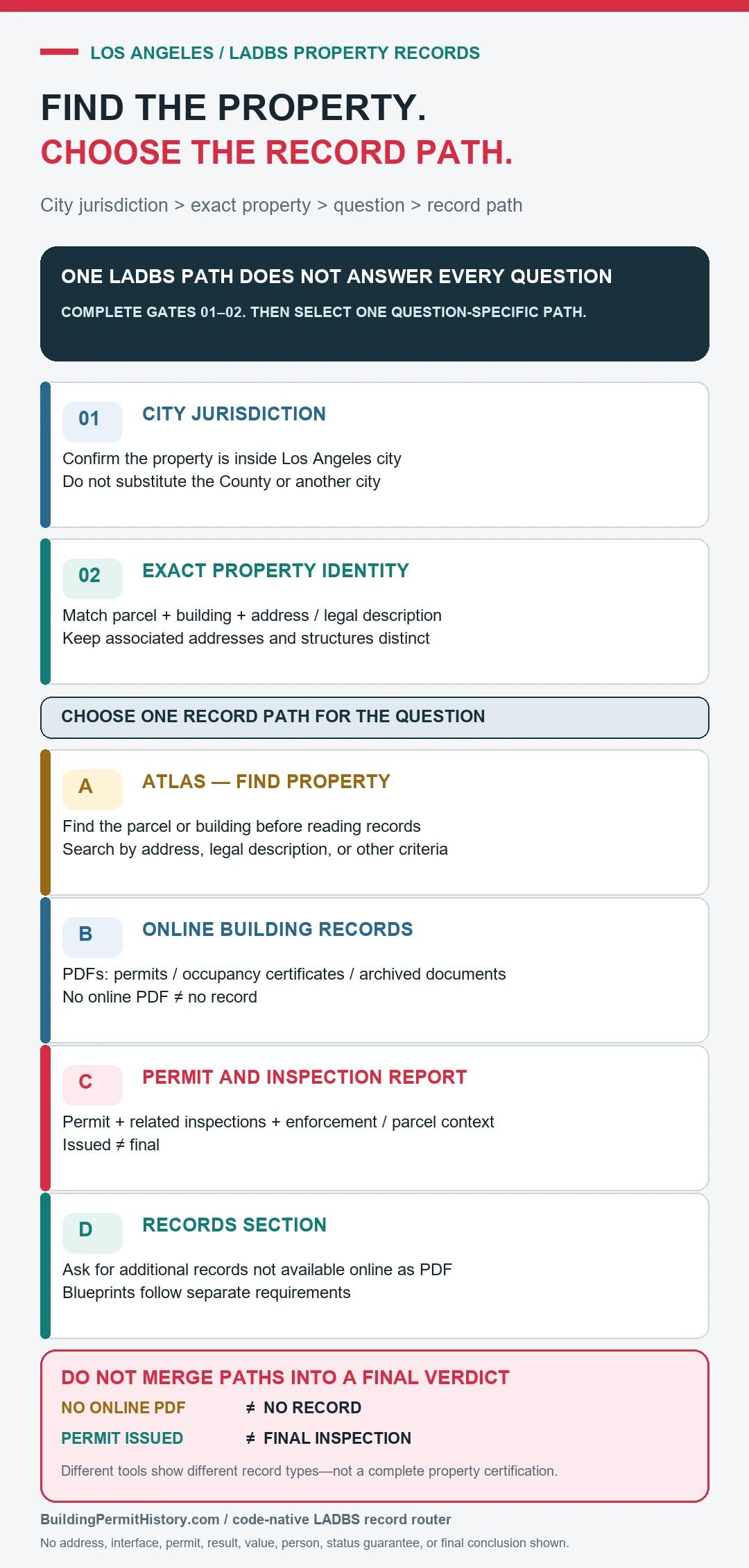
Use the correct Los Angeles record system
The LADBS Plan Review and Permitting page links the current permit-status and related services. Use the permit number when available because an address search can return old projects, alternate addresses, separate structures, and permits with similar descriptions. For older property history, the records search can be more useful than the active application screen.
Older files may be indexed under a former street number, legal description, parcel identifier, or one associated address for the same building. A remodeling project can also have separate building, electrical, plumbing, mechanical, and grading permits. Group records by project and date, but keep each permit number and final status separate. If a seller or contractor provides only one permit, search the same period and address for companion permits before assuming the full scope is represented.
Read the work description as a clue, not a complete field inspection. Short descriptions can omit room locations, revised plans, deferred submittals, or changes made after issuance. When the present building differs from the document, note the exact feature and ask LADBS which permit, approved plan, or inspection record should account for it.
Build a permit timeline instead of counting results
- Confirm the City of Los Angeles jurisdiction, address, parcel, and any associated building identifiers.
- List each relevant permit number, work description, issue date, applicant or contractor, and current status.
- Open inspection entries and look for the final inspection or other completion evidence required for that permit.
- Compare certificates of occupancy and code-enforcement records when the use or occupancy is part of the question.
- Request missing records from LADBS and ask the department to interpret conflicting or incomplete status information.
Issued, expired, and final are different events
An issued permit generally shows authorization for the described work under that record. It does not by itself show that work started, matched the approved scope, passed every inspection, or received final approval. An expired or withdrawn application can still be useful history, while a final inspection for one permit does not close unrelated permits at the same address.
The permit lookup by address guide explains parcel, permit-number, and status matching. The final inspection status guide explains why an issued permit, a passed inspection and permit closeout are different checks. Confirm the exact permit and its latest result in LADBS records; the general guide is not a Los Angeles record source.
What 104,603 recent Los Angeles permits show about express permits and stale “Issued” status
We downloaded every LADBS building permit issued in 2023 and 2024 from the city’s open data set (LA Open Data, Building and Safety – Building Permits Issued from 2020 to Present, pulled October 23, 2026). We left out supplemental and revision permits and kept the 104,603 original permits, then measured how long plan-checked permits took from submittal to issue and what status each permit shows now. The numbers below are our own calculation from LADBS’s published data, not figures published by LADBS. For permits issued in 2022, our Los Angeles and Chicago renovation permit breakdown shows which home projects most often lack a final.
| Permit type (city category) | Permits issued 2023–24 | Days from submittal to issue, plan-checked permits (median) | Slowest 10% took at least | Still “Issued” in October 2026 |
|---|---|---|---|---|
| Alteration or repair, one- or two-family home | 49,338 | 51 | 292 days | 21% |
| Addition, one- or two-family home | 9,031 | 145 | 562 days | 28% |
| New one- or two-family home | 6,656 | 270 | 851 days | 26% |
| Pool or spa, one- or two-family home | 3,188 | 59 | 306 days | 30% |
| Apartment alteration or repair | 12,737 | 124 | 968 days | 26% |
| Commercial alteration or repair | 7,706 | 104 | 391 days | 23% |
| All building permits | 104,603 | 119 | 590 days | 24% |
Three things stand out for anyone checking a Los Angeles house before buying.
- Most home permits skip plan check. 79% of alteration and repair permits on one- and two-family homes were Express Permits, issued without plan review. When plan check was needed, the median wait was 51 days and the slowest 10% took 292 days or more. An express permit on the record is normal. What matters is whether it reached a final inspection.
- “Issued” stays on the record, and “Expired” rarely appears. Of 24,325 home alteration and repair permits issued in 2023, 20% (4,840) still show “Issued” nearly three years later. Only 1.1% of all permits in the set show “Permit Expired.” An old permit that still says Issued has no recorded final, so ask the seller or LADBS whether the work was finished and inspected rather than reading it as active.
- Re-roofs are the permit to check. Nearly half of those 2023 home permits (11,429) mention a re-roof, and 20% of them still show Issued. The share barely moves with project size: 19% to 21% in every cost band from under $10,000 to over $150,000. That differs from our Seattle permit analysis, where smaller jobs expired more often.
Limits of this count: the data set lists only permits that were issued, so applications still in plan check or abandoned before issue are not counted, and the timing covers permits issued in 2023–2024 whatever year they were submitted. Express Permits have no separate submittal date, so they are left out of the timing columns. Valuation is the declared job value. Statuses are LADBS’s current status field as published on the pull date above.
Pick a city, a type of work, and a year. See how long similar permits took to issue and how many never recorded a final inspection.
To compare the Los Angeles wait with other cities, see our data on how long building permits take in six places.
What the public record cannot certify
A public permit search does not certify present safety, workmanship, code compliance, property boundaries, title, or the absence of unpermitted work. Online records can be incomplete, scanned under another address, or updated after the search. For a purchase or construction decision, pair the record with a physical inspection and confirmation from LADBS or the relevant professional.
Unpaid LADBS code violation fees can end up as a lien on the parcel. Our property lien search guide explains how that happens and where to check.
Los Angeles permit search questions
Why do several addresses appear for one parcel?
Corner lots, apartment complexes, address changes, and multiple buildings can create associated addresses. Match the parcel and project description.
Does an issued permit mean the job passed final inspection?
No. Open the inspection history and look for the completion status required for that specific permit.
What if the document is not online?
Use the LADBS Records Section path. The department notes that additional records may be available even when no PDF appears online.
Long Beach runs its own building department, so LADBS won’t hold its permits; see how to search Long Beach building permit records.
LADBS service and records pages were checked July 21, 2026.
If a complaint about work without a permit appears on a Los Angeles address, our analysis of Los Angeles unpermitted construction complaints shows how 7,187 reports from 2022 ended and what an Order to Comply costs the owner.
For new homes, additions and ADUs, our Los Angeles certificate of occupancy guide shows how to find the certificate and how long permits took to reach one.
The contractor on a Los Angeles permit should hold an active California license in the right classification; our CSLB license lookup guide shows how to check status, bond and workers’ comp.
More from our permit data: what public permit records show across seven places.